Norton VPN: Main Features
After researching Norton VPN, our team found the following main features:
- Over 100 server locations across the globe
- Industry-standard AES-256 encryption
- Protocols include WireGuard and IPsec/IKEv2
- Kill switch
- No-log policy
- Split tunneling
- Double VPN and IP rotation
- Streaming optimization and Smart TV support
- Scam Protection (VPN Plus)
- 60-day moneyback guarantee
Norton VPN Security Features
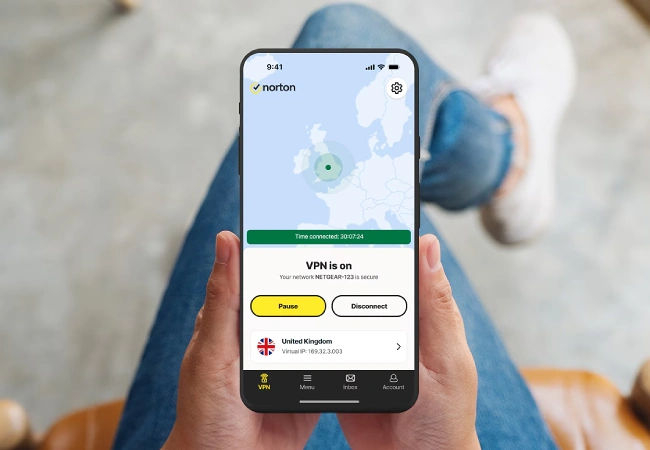
A VPN encrypts your internet traffic and sends it through a server that hides your IP address and ensures your online security. In the following sections, we will share what we learned about Norton VPN’s security features.
Over 100 Server Locations
It’s important to be able to choose a server that is fast and optimal for your internet needs. Norton VPN offers servers in more than 100 locations across the globe, allowing you to access geo-restricted content across borders. You can change your server location to watch movies and shows, browse websites, and access other international content.
Industry-Standard Encryption
Encryption is a process that scrambles your internet data, making it illegible for third parties. Norton VPN uses AES-256 encryption, which is recognized as the industry standard. It’s the same encryption protocol that is used by governments, banks, and the military. Using an industry-standard encryption ensures that your data is secure as it goes through the VPN tunnel.
Top-Tier VPN Protocols
A VPN protocol is the basis of the security, speed, and reliability of the VPN you are using. For example, the protocol is what enables your VPN to bypass firewalls or geo-restrictions. Norton VPN uses the top-tier, well-established OpenVPN, WireGuard, and IKEv2 protocols. Norton also has its own Mimic protocol. The VPN app can automatically select the protocol that is optimal for your use, or you can manually select a protocol.
No-Log Policy
Norton VPN has a no-log policy, which is essential for maintaining privacy and protecting your data. “No-log” means that Norton does not keep logs or store information regarding user activity such as website visits or online browsing. We like the fact that Norton’s no-logs policy is third-party verified, ensuring accountability.
Split Tunneling
Norton’s split tunneling feature lets you choose when to send internet traffic through the VPN and when to bypass it. This feature helps minimize slowdown for activities that don’t send sensitive data over the internet. For example, you can use the VPN for activities such as online banking or shopping while bypassing the VPN when you use your wireless printer.
Ad Blocker
We like the built-in Ad Blocker that comes with the Norton VPN. It helps maintain speed, prevent annoying pop-pups, and block trackers. Ad Blocker helps protect your online activity from prying eyes and malicious third parties. Norton VPN gives you the option of enabling or disabling the Ad Blocker function. You can also adjust settings to allow “acceptable ads” that you want to see.
Double VPN and IP Rotation
Norton VPN provides a double VPN that encrypts your data twice and sends it through two VPN servers, adding an extra layer of protection. There’s also an IP rotation feature that periodically and automatically changes your IP address. This feature third party trackers and advertisers who want to snoop on your online activity.
Streaming Optimization and Smart TV Support
Norton VPN includes features that protect your streaming and smart TV viewing. Norton uses optimized servers, protocols, and fast speeds for reliable streaming, and can access popular streaming services including:
- Netflix libraries
- Amazon Prime Video
- Hulu
- Disney+
- BBC iPlayer
The VPN supports Smart TV platforms Google TV and Apple TV. This service is available only for multi-device plans, such as Norton VPN Plus.
AI-Powered Scam Protection
Norton VPN Plus has an AI-powered scam protection feature that analyzes websites, alerts you to suspicious emails and texts, and analyzes videos and voice recordings for AI-manipulated content. We’re impressed with the AI-powered protection offered by Norton VPN Plus.
Norton VPN Review: System Requirements
We like the fact that Norton VPN is compatible with popular platforms. Norton VPN works with the following systems:
Windows:
- Microsoft Windows 11/10 (all versions except Windows 11/10 in S mode)
- Microsoft Windows 8/8.1 (all versions)
- Microsoft Windows 7 (32-bit and 64-bit) with Service Pack 1 (SP 1) or later
Mac:
- Current and previous two versions of Apple macOS
Android:
- 10.00 or later, with Google Play installed
- Google TV with Android TV OS 10.0 or later
iOS:
- iPhones or iPads with current and previous two versions of Apple iOS
- Apple TV with current and previous version of Apple tvOS
Norton VPN Plans Overview
Norton VPN is available in three plans. From lowest to highest price, you can choose the Standard, Plus, or Ultimate Plan. The Standard Plan offers an array of essential security features, including Kill Switch, No-Logs policy, Double VPN, and IP Rotation. Additionally, Plus offers AI-powered Scam Protection, Password Manager, and 10 GB of Cloud Backup to store important documents and files. The Ultimate Plan has the added Parental Control feature, along with 50 GB of Cloud Backup.
With a single Standard account, you can use Norton VPN on 5 devices. The Plus and Ultimate Plans let you use 10 devices on a single plan.
Why Choose Norton VPN?
After our research, we believe that Norton VPN offers a robust suite of security and privacy features. Whether you choose the Standard, Plus, or Ultimate Plans, you will have access to a wide selection of server locations, as well security features such as Kill Switch, Double VPN, and IP Rotation. Norton offers additional features with the Standard and Ultimate Plans that provide peace of mind when you’re browsing websites or streaming music.
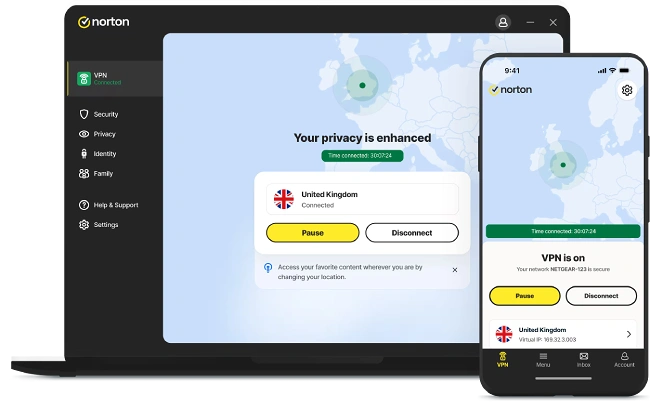
Even if you’re a beginner, we think you’ll find that Norton VPN is easy to use. No matter which device you use, the interface is clean and intuitive. For example, it takes just one click to connect. The streamlined interface does mean that there are fewer customization options for advanced users. However, we think that the uncluttered, straightforward approach makes this a great choice for beginners or users who don’t care to tinker with the settings.
Another Norton VPN benefit is its compatibility with popular platforms. The Plus and Ultimate plans let you use the VPN with 10 devices on one account. The Standard Plan has a five-device capacity, which is a bit limited for a family but may work fine for an individual.
We like Norton VPN’s variety of customer support options. There’s a “Contact Us” form, live chat, and virtual assistant chat. There’s also a blog and a selection of user guides to help answer questions.
With annual subscription plans, Norton VPN offers a 60-day moneyback guarantee. It’s helpful to have two months to try the VPN and decide if it’s the best VPN for your internet security needs. If you are not satisfied with the product, you can contact support within 60 days of purchase for a full refund.
Norton VPN Review: Final Thoughts
We believe, after our research, that Norton VPN offers strong security and protection for your internet data. With a streamlined, intuitive interface, it’s an especially great choice if you are new to using VPNs. Norton VPN uses industry-standard AES-256 encryption and well-established VPN protocol.
We like the fact that every subscription plan offers robust protection, with features ranging from more than 100 server locations and No-Logs policy to Double VPN and IP Rotation. Plus, you get even more protection, such as Scam Protection and Cloud Backup, from the Plus and Ultimate plans. The generous, 60-day moneyback guarantee gives you plenty of time to decide if Norton VPN will work for you.
We think that beginners will appreciate the clean, easily navigated user interface of Norton VPN. With just one click, you can connect to a server and have a private and secure internet experience.
Finally, Norton VPN comes with a variety of customer support options. If you prefer, you can chat with a live agent. Or you can opt for the virtual assistant chat, Contact Us form, or user guides.
We recommend the Norton VPN, after our research and review. In our opinion, it is a quality product of value.