Main Features
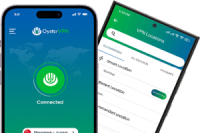
After our research and review of OysterVPN, we believe that it offers the following main features:
- Industry-standard AES 256 encryption
- Zero-logs policy
- Privacy-friendly jurisdiction
- Kill switch
- Split tunneling
- Adware and malware blockers
- 30-day moneyback guarantee
OysterVPN Review: Security and Privacy Features
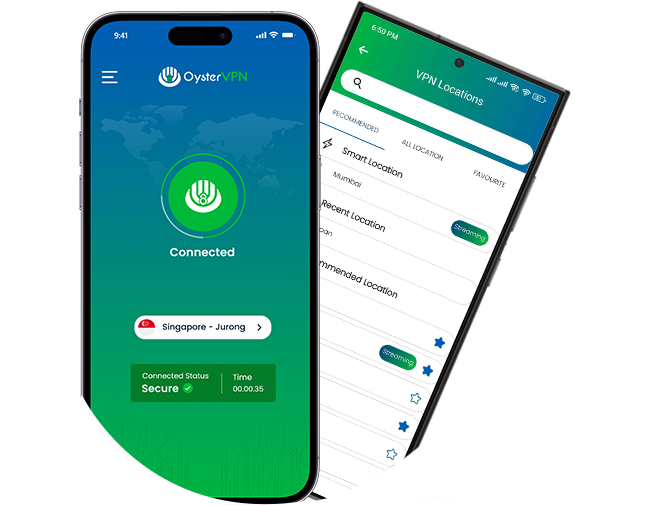
From encryption to server locations, the best fast VPN brands offer strong security and privacy features. In the following sections, we’ll look at the features provided by OysterVPN.
Industry Standard Encryption
OysterVPN uses top-tier, AES 256 encryption when it sends your internet traffic through the VPN tunnel. This encryption protocol is used by government and military organizations, as well as journalists, human rights activists, and anyone else who needs robust, industry-standard encryption.
Plus, OysterVPN uses a variety of tunneling protocols that work with AES 256 encryption, including OpenVPN, IKEv2, SSTP, and L2TP/IPSec. OysterVPN lets you use the protocol that best suits your security needs.
Kill Switch
With OysterVPN‘s internet kill switch, your data remains secure even if you lose VPN connection. The kill switch automatically blocks internet access in the event of an OysterVPN service disruption. Even a leading fast VPN can experience connection disruptions, so the internet kill switch is a valuable security feature.
DDoS Protection
DDoS (distributed denial-of-service) attacks are becoming increasingly numerous and troublesome, causing a system to slow down and eventually collapse. OysterVPN provides protection against DDoS cyberattacks by monitoring incoming traffic and denying access to traffic that is not authentic.
Zero-Logs Policy
OysterVPN has a strict no-logs policy. In other words, the company does not store user data, which means that your sensitive information is removed after you log off. There’s nothing for prying eyes to see, because it has been removed without a trace.
Ad Blocker and Anti-Malware Protection
Protection against unwanted ads and malicious websites is essential in a top VPN. OysterVPN comes with a built-in Ad Blocker that blocks ads and popups so you can watch a video without having to sit through ads.
Anti-malware protection is another important security feature included in OysterVPN. This feature prevents third parties from installing malicious software that can steal financial and other personal information. It detects and removes the latest malware strains to keep you secure and protected.
Does the OysterVPN sound like a good fit for you? See what else buyers have to say.
See Buyer Reviews
DNS & IP Leak Protection
One of the main purposes of a VPN is to keep your internet queries private. When you’re Browse the internet, a DNS (Domain Name Service) leak is something you don’t want to happen. Fortunately, OysterVPN keeps your DNS queries encrypted and within the VPN server, preventing leakage to your ISP.
OysterVPN also prevents IP leakage. In other words, it hides your actual IP when it sends your internet traffic through the VPN tunnel. OysterVPN provides protection against IPv6 and IPv4 leaks, a common issue among VPN users.
Split Tunneling
Some internet traffic, such as using a wireless printer over a home network, is less sensitive than online shopping, banking, and other traffic that involves personal information. The split tunneling feature allows you to send less sensitive data through your regular network, avoiding slowdowns that can occur with VPN use. Financial and other personal data still go through the VPN, with all its protections.
OysterVPN Review: Benefits and Any Disadvantages
There are many other factors to consider when searching for the best fast VPN. Below we share our opinion, based on our research, of the benefits and any disadvantages we found with OysterVPN.
Servers and Locations
OysterVPN offers a wide selection of servers across the globe. You can choose from more than 441 servers in over 35 locations. Servers are available in North America, Europe, Asia, Africa, and the Middle East, and the company states on its website that the list is growing.
Privacy-Friendly Jurisdiction
Thanks to Oyster’s location in a privacy-friendly jurisdiction, you don’t have to worry about surveillance or data retention. Oyster is based in Ireland, which has laws that protect internet privacy. While some countries, including the United States, have laws that promote data retention and surveillance, OysterVPN is based in a jurisdiction that does not require providers to retain user data.
Compatibility and Number of Devices
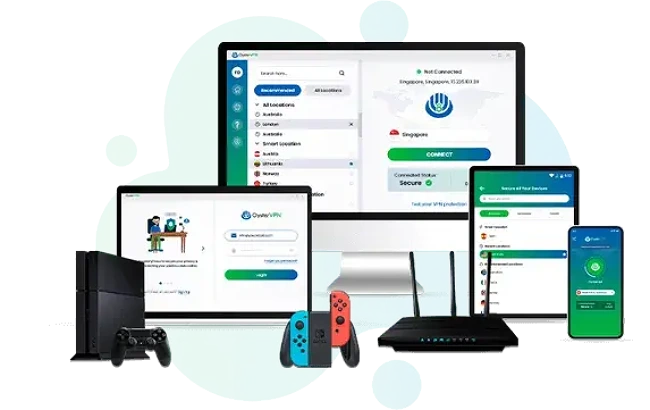
With a single OysterVPN account, you can connect up to five devices simultaneously. Some VPNs can connect to a greater number of devices, or even an unlimited number of devices. To extend capacity, however, you can connect a household router to OysterVPN. This VPN works with all types of devices, including computers, smartphones, tablets, and Smart TVs.
OysterVPN is compatible with a wide range of major platforms:
- Windows
- Mac
- iOS
- Android
- Linux
- Chromebook
Streaming Servers
Speaking of platforms and compatibility, OysterVPN’s streaming servers help you enjoy streaming services like Disney+, Hulu, and Max with added privacy and security. With more than 400 server locations in 35+ countries, you’ll have plenty of options to find a fast, stable connection for streaming.
Ease of Use and Installation
OysterVPN setup is relatively easy and requires downloading the app that is specific to your device. For example, to install on a Windows device, just download the app and run the setup. Click yes to allow the app to make changes to your device. After the installation finishes, log in to OysterVPN and connect to your choice of server.
The interface is straightforward enough for VPN beginners to use. It’s uncluttered and intuitive, with a list of servers on the left and a quick connect button on the right.
24/7 Customer Service
OysterVPN offers live customer support 24/7 so you can ask any pressing VPN-related questions as they arise. There’s live chat with an actual human representative, plus email, tutorials, and guides. From FAQs to billing, manual setup, and other topics, you can find helpful information at OysterVPN‘s customer support center.
Subscription Plans and Money-Back Guarantee
OysterVPN offers three relatively affordable subscription plans. The monthly plan costs the most per month, but it is still lower priced than many other VPNs. OysterVPN also offers a lifetime subscription for a one-time payment and a 1-year subscription that costs less per month than the monthly plan. As these plan details can change, and there are limited-time discounts for new subscribers from time to time, check the OysterVPN site for the latest info.
Maybe you’re not sure if OysterVPN is the right VPN for you, or maybe you’d just like to try it out for a while. OysterVPN subscriptions come with a 30-day money-back guarantee for just that reason. In the unlikely case you’re not satisfied with OysterVPN, you can apply for a full refund within 30 days of your purchase.
Final Thoughts on the OysterVPN Review
We believe, after our research, that OysterVPN offers strong security and privacy protection for your online data. We’re impressed with the top-tier, industry-standard encryption, which is the same protocol trusted by many governments, businesses, and individuals. With an extensive selection of servers and server locations, you can connect to a server that will work for your internet use. There are even streaming servers for optimal, secure streaming enjoyment.
We like that OysterVPN is based in a privacy-friendly jurisdiction that does not require VPN providers to store user data. OysterVPN has a no-logs policy to protect user privacy. This policy means it does not collect logs of user’s activity. We think you’ll also like the adware and malware blockers included with OysterVPN. Even the newest malware is detected and removed, keeping your security and privacy protection up-to-date.
OysterVPN also offers strong DNS and IP leak protection. Your internet queries and IP safely stay within the VPN tunnel instead of your ISP. And if you lose VPN connection, OysterVPN‘s kill switch shuts down your internet access to keep your data more secure.
Also great is the live chat feature that lets you chat with a human representative. If you prefer, you can contact customer service by email, too. There’s also an extensive customer support center with user guides, tutorials, and FAQs.
We like the selection of subscription plans, all of which are well-priced for the valuable features included. With a choice of monthly, annual, or lifetime plans, internet users can find an OysterVPN plan that’s suitable for their needs and budget. The money-back guarantee is a plus as well.
Considering our research into OysterVPN and the features we found, we recommend including OysterVPN in your search for the best fast VPN.