Top Features
After researching and reviewing Surfshark VPN, our team believes that the main features are the following:
- Robust AES-256 encryption
- Independently-confirmed no-logs policy
- RAM-only servers
- Private DNS
- Dynamic MultiHop
- Kill switch
- Split tunneling
- Patented Everlink tech
- 24/7 customer support
- 30-day money-back guarantee

Surfshark VPN Security Features
Surfshark VPN offers comprehensive security and privacy protection. Whether you’re streaming TV shows or browsing the internet, Surfshark protects your online data.
Reliable VPN Protocols
Surfshark uses three of the most common VPN protocols:
- WireGuard: Enhanced for a more stable connection, its minimalist structure allows fast speeds and robust security.
- IKEv2: Ideal for mobile use, it’s fast and secure and readily switches networks.
- OpenVPN: An open-sourced protocol, it’s often the only choice for routers and manual connections.
High-Standard Encryption
With Surfshark, you get AES-256-GCM encryption, which is the highest available standard. For WireGuard, Surfshark uses ChaCha20 encryption, which is similar to AES-256.
Does the SurfsharkVPN sound like a good fit for you? See what else buyers have to say.
See Buyer Reviews
RAM-Only Servers
Surfshark servers run only on RAM, which wipes the data with every reboot.No data is left on the hard drive. In fact, Surfshark states that it is one of the first VPN providers to upgrade to RAM-only servers.
Private DNS
Your online queries have an added layer of protection, thanks to Surfshark VPN’s private DNS. Instead of sending internet traffic through a DNS provided by your ISP, Surfshark uses encrypted DNS on all of its servers.
Dedicated IP
The dedicated IP is uniquely yours and stays the same every time you use your Surfshark VPN. Unlike a shared IP, it won’t randomly change whenever you log on, and it does not belong to multiple users. A dedicated IP helps you avoid CAPTCHAs and blocks caused by another user’s activity on a shared IP. Dedicated IPs are currently available in Europe, North America, Asia, and Africa, although locations can change.
IP Rotator
We’re impressed with Surfshark VPN’s multiple layers of protection. For example, IP Rotator makes it even more difficult for hackers to find your data. Every 5 to 10 seconds, IP Rotator changes the IP address for your server location, keeping your activity hidden from trackers.
Dynamic MultiHop
With Dynamic MultiHop, you use VPN servers in two locations at the same time. The double VPNs make it more difficult for malicious third parties to attack your connection. We like the customizability of this feature, which lets you choose two server locations from more than 100 countries.
Additional Features
We’re impressed with the variety of features available with Surfshark VPN. Below are some additional features that enhance your online security.

Clean Web Ad Blocker
The Clean Web Ad Blocker lets you browse the internet without unwanted ads, malware, and third-party trackers. Thanks to this feature, you can visit websites, watch videos, and check emails without worrying about phishing attempts or other malicious activity.
VPN Tunnel Bypasser
You may prefer not to send all of your internet traffic through the VPN tunnel. Surfshark’s VPN Tunnel Bypasser lets you choose which online traffic to send directly to the internet. Also know. As split tunneling, Bypasser helps keep your connection fast by sending only selected activity through the VPN.
Kill Switch
Kill Switch protects your data if your Surfshark VNS connection suddenly drops. This feature blocks access to the internet if you unexpectedly lose your VNS connection. Your sensitive information is protected even when you VNS is down.
Innovative Everlink
A unique feature of Surfshark is its patented Everlink technology. Available by default with the WireGuard protocol across all platforms, it offers a more reliable VPN connection and better IP address protection.
The advanced, exclusive tech differs from a kill switch; instead of terminating your internet connection (a reactive action), it proactively reconfigures the VPN tunnel without needing to reconnect and disconnect from the VPN service. You don’t get disconnected, and the infrastructure seamlessly works automatically behind the scenes.
Surfshark VPN Browser Extensions
If you prefer, you can secure your browser only with Surfshark VPN’s browser extensions. Available for Chrome and Firefox, extensions are available with a paid Surfshark VPN subscription. For added convenience, you can pin the extension to your browser toolbar.
Camouflage Mode
Some ISPs and networks, such as schools, businesses, and heavily censored countries, will block internet traffic that goes through a VNS tunnel. Surfshark’s Camouflage Mode disguises your online traffic to make the VPN undetectable. Also known as obfuscated servers, Camouflage mode is available with the OpenVPN protocol.
Smart DNS
Maybe you want to stream movies and shows, but your TV doesn’t support Surfshark VPN. Smart DPN changes your DNS to match Surfshark’s US-based servers, so you can use its US-based streaming protection. Smart DNS only works with Netflix, Hulu, and Disney Plus, and does not offer the full security of Surfshark VNS.
Surfshark VNS Review: Benefits and Any Drawbacks
Now that we’ve looked under the hood, let’s see what it’s like to use Surfshark VPN. We have researched and reviewed Surfshark. In our opinion, it offers many benefits. We will also note any limitations we believe we have found.
Surfshark VPN Server Locations
Surfshark VPN has more than 3200 servers in 100 countries in Europe, the Americas, Asia Pacific, and the Middle East and Africa. Popular server locations include:
- United States
- UK
- Australia
- Canada
- The Netherlands
- Germany
Surfshark is based in the Netherlands, which is a privacy-friendly country that complies with the EU’s General Data Protection Regulation (GDPR).
Ease of Use
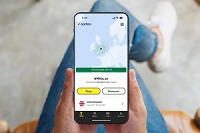
The user interface is simple and straightforward, taking minutes to install. Once installed, just click the connect button to connect to a server. Depending on your needs and preferences, you can choose either the closest or fastest server.
24/7 Customer Support
With Surfshark, users have access to customer support in a variety of ways. Live Chat is available 24/7, with actual human support. You can also email support or visit Surfshark’s Help Center, which includes FAQs and product guides.
Confirmed No-Logs Policy
Surfshark does not keep a log of user internet activity. According to the Surfshark website, this no-logs policy has been independently tested and confirmed by the auditing firm Deloitte. Since there is no log of your online traffic, there is no information for hackers to find. Deloitte reaffirmed that Surfshark does not log or track users’ activities in its ISAE 3000 report. This assurance report is available to Surfshark users in the Surfshark account. Independent verifications like this one assure users of the company’s commitment to top-quality standards and privacy.
Exclusive VPN Technology
For those wanting the latest tech, Surfshark has a patented Everlink infrastructure. If you’re using a server that has an issue, Everlink instantly and smoothly reconfigures the VPN connection to another working server. That means fewer connection drops, enhanced IP address protection, and no interruptions due to server maintenance. This unique server backup system activates automatically when connecting to the Surfshark VPN using the WireGuard protocol.
DNS Leak Test Tool
Sometimes personal information becomes vulnerable online, whether it’s due to a manually configured VPN or a malicious hacker. For example, you don’t want your ISP provider to track your browsing habits and sell the information to marketing companies.
Surfshark’s DNS Leak Test Tool lets you know if your online use is exposed and visible to unwanted trackers. Installing a reputable VPN like Surfshark offers much more reliable security features.
Unlimited Devices with One Account
With a single account, you can use Surfshark VPN on unlimited devices. It’s compatible with popular platforms:
- Windows
- MacOS
- iOS
- Android
- Smart TVs
- Routers
Just install Surfshark and enjoy unlimited secure connections.
Surfshark VPN Subscription Plans
Surfshark offers three VPN plans. Surfshark Starter is the most basic plan, with Surfshark One and Surfshark One+ offering additional security features such as Surfshark Search and Alternate ID.
Subscriptions are available in 1-month, 1-year, or 2-year plans. The 1-year and 2-year subscriptions include 2 free months. As is the usual case, the longer subscriptions have the lowest per-month cost.
Check Price Plans
30-Day Money-Back Guarantee
All Surfshark subscriptions come with a 30-day money-back guarantee, which is comparable with most VPN providers. If you decide within 30 days of purchase that you no longer want Surfshark VPN, just contact support and claim your refund through Live Chat.
Surfshark VPN Review: Concluding Thoughts
Surfshark VPN is loaded with features you would hope to find when shopping for a top VPN. With 3200+ servers in 100 countries, it offers robust protection for your internet data. Plus, it has an easy-to-use interface that will appeal to VPN newbies and veterans alike.
We applaud the extensive selection of Surfshark features, which can be used with unlimited devices. The AES-256-GCM encryption protocol is the strongest available. The three VPN protocols are reliable and time-tested WireGuard, IKEv2, and OpenVPN. Advanced features such as Dynamic MultiHop, Camouflage, and IP Rotator combine with standard features such as Kill Switch and Bypasser (split tunneling). Also, get exclusive tech with Everlink, increasing VPN connection stability.
Even if your smart TV doesn’t support Surfshark, the Smart DNS lets you use its US-based servers for streaming. You can use Smart DNS with major streaming platforms, but we wish it worked on more than three channels.
We like the fact that Surfshark VPN’s no-logs policy is independently tested and verified. It has been verified again, providing independent assurance that users’ browsing and activities are not tracked or logged. The no-logs system combines with RAM-only servers to ensure that your data is nowhere to be found.
Surfshark users have access to customer support any time, day or night. From 24/7 Live Chat to the library of user guides, help is available when you need it.
We also like Surfshark’s competitively priced VPN subscription plans. The one- and two-year plans are an especially good value.
Thanks to the 30-day money-back guarantee, you have a month to decide if Surfshark VPN is right for you.
From the industry-standard encryption to the DNS leak detection tool, we believe Surfshark provides a quality VPN. We have researched and reviewed Surfshark, and in our opinion we can recommend it for your Internet security.
Visit Official Site